When 500 Tags
Became a Design Problem
When 500 Tags
Became a Design Problem
Overview
Overview
At FutureFit AI, customers used tags to organize users by career stage and program type — a simple system that was supposed to make management easy. But over time, that clarity turned into chaos. We weren’t building something new — we were fixing something familiar. Customers could create tags, but not edit, delete, or organize them later. The result? A trail of duplicates, inconsistencies, and abandoned tags piling up across accounts.
On average, customers created over 500 tags, but only 20% were ever used. What was once a helpful organizational tool became an unmanageable backlog — and every cleanup required manual support from our internal team. As the Senior Product Designer leading this initiative, I recognized that the issue wasn’t just messy data; it was a growing operational strain that touched both customers and internal teams.
At FutureFit AI, customers used tags to organize users by career stage and program type — a simple system that was supposed to make management easy. But over time, that clarity turned into chaos. We weren’t building something new — we were fixing something familiar. Customers could create tags, but not edit, delete, or organize them later. The result? A trail of duplicates, inconsistencies, and abandoned tags piling up across accounts.
On average, customers created over 500 tags, but only 20% were ever used. What was once a helpful organizational tool became an unmanageable backlog — and every cleanup required manual support from our internal team. As the Senior Product Designer leading this initiative, I recognized that the issue wasn’t just messy data; it was a growing operational strain that touched both customers and internal teams.
Role & Details
Role & Details
Senior Product Designer | FutureFit AI
Senior Product Designer | FutureFit AI
User Research, Interaction, Visual Design
User Research, Interaction, Visual Design
1 Product Manager, 2 Engineers, 1 Data Analyst & Head of Product
1 Product Manager, 2 Engineers, 1 Data Analyst & Head of Product
Launched in 2023
Launched in 2023

The Problem
The Problem
How might we empower customers to manage their own tag ecosystem — without creating extra work for our internal teams?
How might we empower customers to manage their own tag ecosystem — without creating extra work for our internal teams?
We needed a solution that gave customers control without compromising data
integrity — a balance of flexibility and structure.
We needed a solution that gave customers control without compromising data
integrity — a balance of flexibility and structure.
Ideation & Feasibility
Ideation & Feasibility
Design Meets Engineering:
Finding the Sweet Spot
Design Meets Engineering:
Finding the Sweet Spot
Time was against us — we needed to deliver a feasible idea, fast. I led a whiteboarding session on Miro to explore every possible approach to improving tag management. Together with Engineering, we brainstormed potential solutions, mapped them on an effort vs. impact chart, and listed pros and cons for each. This visual collaboration made trade-offs clear at a glance and helped us align quickly on the most viable path forward — one that balanced usability, scalability, and delivery speed.
Our Approach
Our Approach
One thing became clear — we needed a better system, not more buttons.
One thing became clear — we needed a better system, not more buttons.
Our brainstorming shifted the focus from fixing the old flow to rethinking the entire end-to-end experience. The tag modal had reached its limit, so I proposed evolving it into a dedicated dashboard section that felt seamless and scalable. Partnering with the Data team, I learned that permanent deletion risked breaking reporting accuracy, and together we aligned on an archive-and-restore model that gave customers flexibility while keeping data clean and reliable.
Our brainstorming shifted the focus from fixing the old flow to rethinking the entire end-to-end experience. The tag modal had reached its limit, so I proposed evolving it into a dedicated dashboard section that felt seamless and scalable. Partnering with the Data team, I learned that permanent deletion risked breaking reporting accuracy, and together we aligned on an archive-and-restore model that gave customers flexibility while keeping data clean and reliable.
Design solutions & Impact
Design solutions & Impact
Empowering customers
Empowering customers
to manage with confidence.
to manage with confidence.

Integrated Within
Existing Workflows
Integrated Within
Existing Workflows
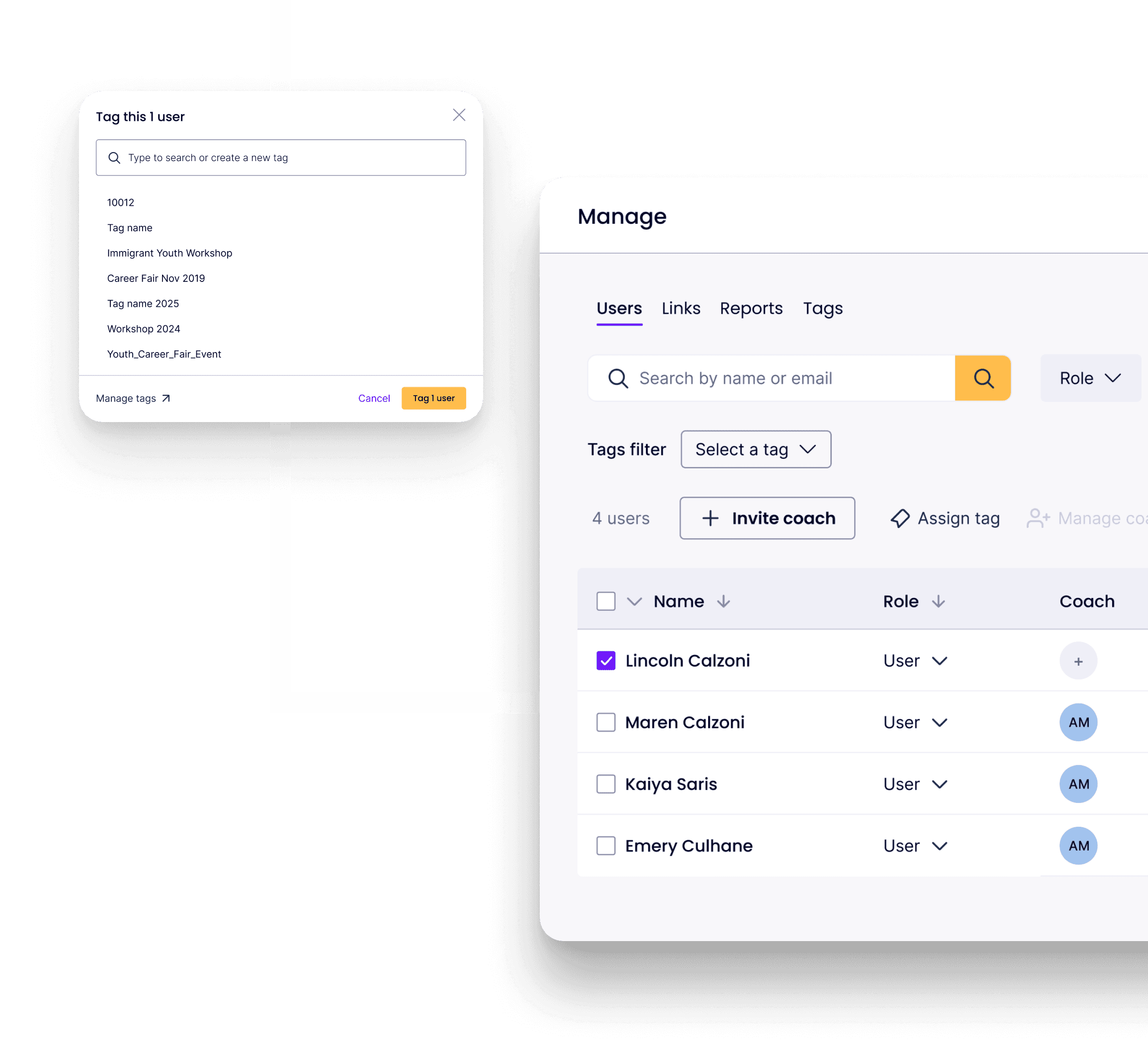
I repositioned Manage Tags into its own home under the “Manage” menu — alongside Users, Reports, and Links — so the feature felt native, not buried. We added a new CTA in the “Assign Tag” modal that guided users to the page whenever they couldn’t find or needed to create a tag, creating a smooth, connected flow between assigning and managing.
I repositioned Manage Tags into its own home under the “Manage” menu — alongside Users, Reports, and Links — so the feature felt native, not buried. We added a new CTA in the “Assign Tag” modal that guided users to the page whenever they couldn’t find or needed to create a tag, creating a smooth, connected flow between assigning and managing.
Impact: Customers instantly understood where to find and use the feature. No issues or complaints were reported post-launch, confirming a seamless integration.
Impact: Customers instantly understood where to find and use the feature. No issues or complaints were reported post-launch, confirming a seamless integration.
Smarter, Self-Serve Tag Management
We built a dedicated section where customers could create, rename, and archive tags independently — no support tickets required. I introduced an archive-and-restore model instead of permanent deletion, giving customers flexibility while preserving data integrity and reporting accuracy.
Impact: Customers praised Manage Tags for being intuitive and easy to use. It quickly became one of the most actively used features on the platform, reducing reliance on internal support.
Smarter, Self-Serve Tag Management
We built a dedicated section where customers could create, rename, and archive tags independently — no support tickets required. I introduced an archive-and-restore model instead of permanent deletion, giving customers flexibility while preserving data integrity and reporting accuracy.
Impact: Customers praised Manage Tags for being intuitive and easy to use. It quickly became one of the most actively used features on the platform, reducing reliance on internal support.
Reflection
Reflection
Who knew 500 tags
could become a design problem?
Who knew 500 tags
could become a design problem?
What started as a cluttered customer pain point became one of our most impactful product improvements. By rethinking tag management end-to-end and collaborating across teams, we transformed chaos into clarity — empowering customers, protecting data, and giving our internal teams back their time. For me, this project was a reminder that meaningful impact often begins with solving the frustrations users have quietly learned to live with.
What started as a cluttered customer pain point became one of our most impactful product improvements. By rethinking tag management end-to-end and collaborating across teams, we transformed chaos into clarity — empowering customers, protecting data, and giving our internal teams back their time. For me, this project was a reminder that meaningful impact often begins with solving the frustrations users have quietly learned to live with.
When 500 Tags Became a Design Problem
Overview
At FutureFit AI, customers used tags to organize users by career stage and program type — a simple system that was supposed to make management easy. But over time, that clarity turned into chaos. We weren’t building something new — we were fixing something familiar. Customers could create tags, but not edit, delete, or organize them later. The result? A trail of duplicates, inconsistencies, and abandoned tags piling up across accounts.
On average, customers created over 500 tags, but only 20% were ever used. What was once a helpful organizational tool became an unmanageable backlog — and every cleanup required manual support from our internal team. As the Senior Product Designer leading this initiative, I recognized that the issue wasn’t just messy data; it was a growing operational strain that touched both customers and internal teams.
Role & Details
Senior Product Designer | FutureFit AI
User Research, Interaction, Visual Design
1 Product Manager, 2 Engineers, 1 Data Analyst & Head of Product
Launched in 2023

The Problem
How might we empower customers to manage their own tag ecosystem — without creating extra work for our internal teams?
We needed a solution that gave customers control without compromising data
integrity — a balance of flexibility
and structure.
The Problem
How might we empower customers to manage their own tag ecosystem — without creating extra work for our internal teams?
We needed a solution that gave customers control without compromising data
integrity — a balance of flexibility
and structure.
Ideation & Feasibility
Design Meets Engineering:
Finding the Sweet Spot
Time was against us — we needed to deliver a feasible idea, fast. I led a whiteboarding session on Miro to explore every possible approach to improving tag management. Together with Engineering, we brainstormed potential solutions, mapped them on an effort vs. impact chart, and listed pros and cons for each. This visual collaboration made trade-offs clear at a glance and helped us align quickly on the most viable path forward — one that balanced usability, scalability, and delivery speed.
Our Approach
One thing became clear — we needed a better system, not more buttons.
Our brainstorming shifted the focus from fixing the old flow to rethinking the entire end-to-end experience. The tag modal had reached its limit, so I proposed evolving it into a dedicated dashboard section that felt seamless and scalable. Partnering with the Data team, I learned that permanent deletion risked breaking reporting accuracy, and together we aligned on an archive-and-restore model that gave customers flexibility while keeping data clean and reliable.
Design solutions & Impact
Empowering customers
to manage with confidence.

Integrated Within
Existing Workflows
I repositioned Manage Tags into its own home under the “Manage” menu — alongside Users, Reports, and Links — so the feature felt native, not buried. We added a new CTA in the “Assign Tag” modal that guided users to the page whenever they couldn’t find or needed to create a tag, creating a smooth, connected flow between assigning and managing.
Impact: Customers instantly understood where to find and use the feature. No issues or complaints were reported post-launch, confirming a seamless integration.
Integrated Within
Existing Workflows
I repositioned Manage Tags into its own home under the “Manage” menu — alongside Users, Reports, and Links — so the feature felt native, not buried. We added a new CTA in the “Assign Tag” modal that guided users to the page whenever they couldn’t find or needed to create a tag, creating a smooth, connected flow between assigning and managing.
Impact: Customers instantly understood where to find and use the feature. No issues or complaints were reported post-launch, confirming a seamless integration.
Reflection
Who knew 500 tags
could become a design problem?
What started as a cluttered customer pain point became one of our most impactful product improvements. By rethinking tag management end-to-end and collaborating across teams, we transformed chaos into clarity — empowering customers, protecting data, and giving our internal teams back their time. For me, this project was a reminder that meaningful impact often begins with solving the frustrations users have quietly learned to live with.
Smarter, Self-Serve Tag Management
We built a dedicated section where customers could create, rename, and archive tags independently — no support tickets required. I introduced an archive-and-restore model instead of permanent deletion, giving customers flexibility while preserving data integrity and reporting accuracy.
Impact: Time-to-value improved by 31%. Within the first month of launch, global search became the most-used action on the homepage.